
On Cloud Shoes Size Guide — Find Your Perfect Fit
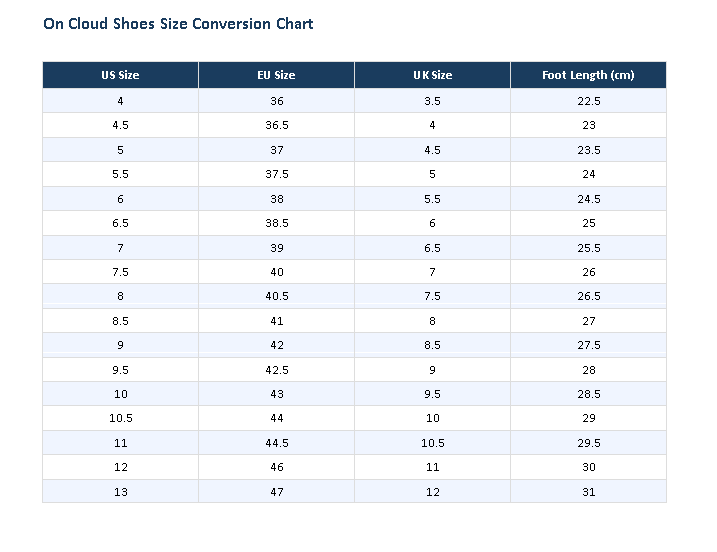
How to Measure Your Foot
- Place a piece of paper on a hard floor and stand on it with your full weight.
- Trace the outline of your foot with a pencil held vertically.
- Measure the longest distance from heel to toe in centimeters.
- Compare this measurement to the Foot Length column above to find your EU size, then cross-reference your US size.
Width Guide — Do You Need Wide Fit?
On Clouds Shoes standard models fit a medium (D) width foot. If you experience pinching on the outer sides of your foot, pressure on your little toe, or toe overlap, you may benefit from a wide-fit model. Our wide-fit options include:
- Cloudsurfer Next Wide — daily running, wide toe box
- Cloudrunner 2 Wide — stability running, extra midfoot room
- Cloudsurfer 2 Wide — maximum cushion, wide fit
On Cloud Shoes Fit Tips by Model Type
On Running Models (Cloudsurfer, Cloud Monster, Cloudrunner)
Size up half a size if you are between sizes. Running shoes benefit from a thumb’s width of space between your longest toe and the end of the shoe. Your foot expands during running, especially on longer runs. Now that you know your size, you’re ready to shop — browse the full range of on the cloud shoes and pick the model that matches your fit, activity, and style.
Lifestyle & Sneaker Models (Cloudnova, Cloud X, The Roger)
Size true to your standard US shoe size. These models have less volume than performance runners and are designed to fit snugly for a clean silhouette.
Kids’ Models (Cloudnova Kids)
We recommend sizing up 0.5 from your child’s measured foot length to allow for growth. Check the foot length column for the most accurate fit.